ImageAssure: Special Instructions

Special Instructions Give Every Camera Context

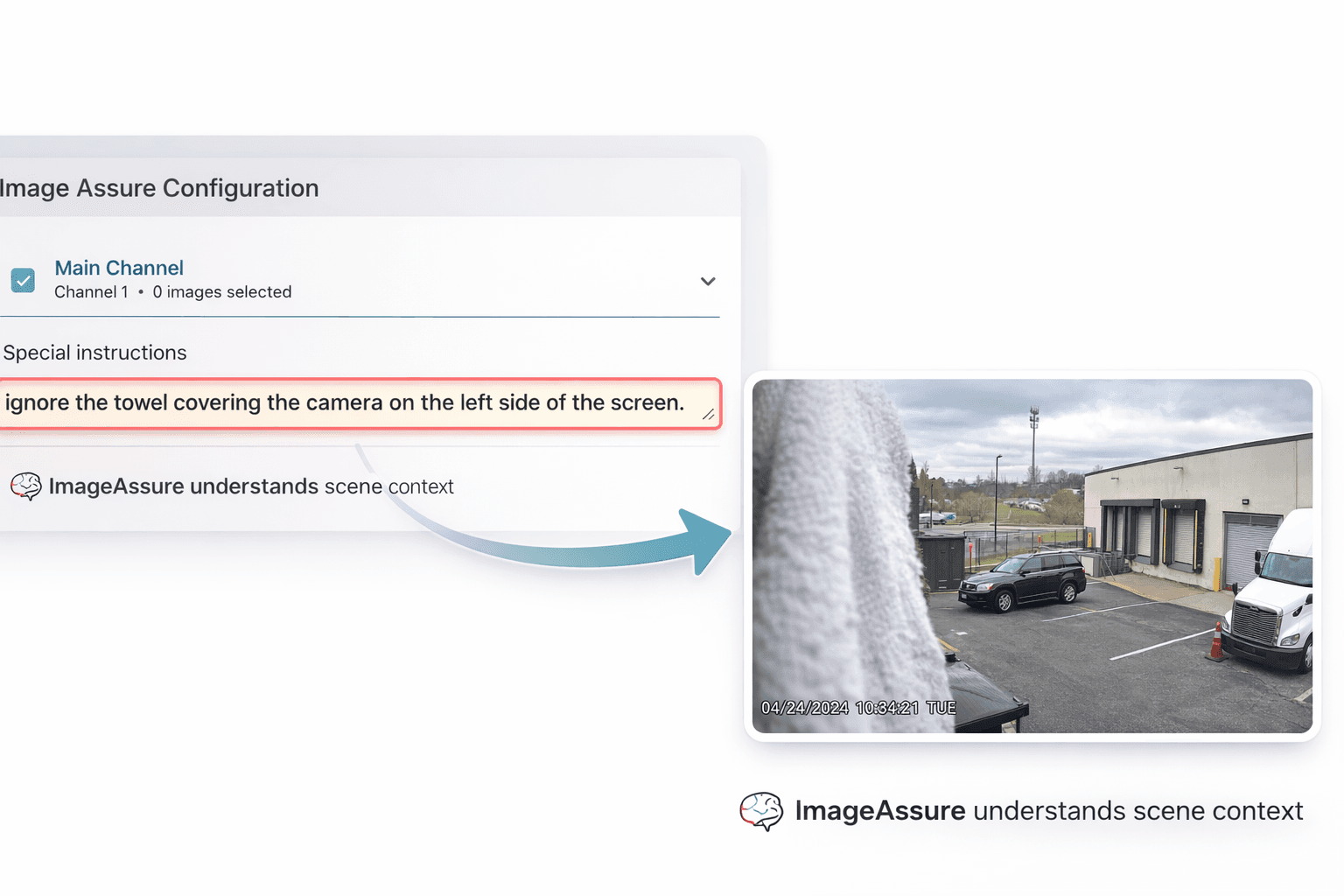
ImageAssure Special Instructions let you define what “normal” looks like for each camera, so alerts are based on real-world expectations, not generic image checks.

The Problem

Generic Monitoring Misses the Reality of the Scene

Traditional image monitoring treats every camera the same, looking for general signs of degradation without understanding the scene. But what’s acceptable in one location may be a problem in another. Lighting, movement, seasonal changes, and camera purpose all affect what should trigger concern.


That’s where Special Instructions make the difference.

Why It Matters

Reduced Alert Noise

Ignore normal environmental changes that shouldn't trigger alarms.

Scene-Aware Monitoring

Each camera is evaluated based on its purpose and environment.

Faster Troubleshooting

Special Instructions provide context that speeds investigation and service response.

Reliable Camera Coverage

Ensure important areas remain visible and usable.

Reliable Camera Coverage

Ensure important areas remain visible and usable.

Special Instructions Features

Define What Matters for Each Camera and Its Environment

Add simple instructions so each camera is evaluated based on its purpose and environment.

  • Instructions Anyone Can Write

    Plain-Language Camera Instructions

    Define what each camera should monitor using simple instructions. No rules engines or complex configuration required.

  • Instructions Anyone Can Write

    Plain-Language Camera Instructions

    Define what each camera should monitor using simple instructions. No rules engines or complex configuration required.

  • Monitoring That Understands the Scene

    Scene-Aware Image Evaluation

    ImageAssure evaluates camera images based on the environment, camera purpose, and expected activity within the scene.

  • Monitoring That Understands the Scene

    Scene-Aware Image Evaluation

    ImageAssure evaluates camera images based on the environment, camera purpose, and expected activity within the scene.

  • Every Camera Is Different

    Camera-Specific Monitoring

    Set different monitoring expectations for every camera so alerts reflect real operational issues, not normal environmental changes.

  • Every Camera Is Different

    Camera-Specific Monitoring

    Set different monitoring expectations for every camera so alerts reflect real operational issues, not normal environmental changes.

See ImageAssure in Action

ImageAssure Demo → with Special Instructions included

Watch how ImageAssure evaluates camera images, detects quality issues, and uses Special Instructions to understand what matters in each scene.

Operational Outcomes of Special Instructions

Smarter Alerts, Fewer False Positives, More Reliable Cameras

  • Reduce False Alerts

    Scene-specific instructions help ImageAssure ignore normal activity like lighting changes, traffic, or environmental movement.

  • Detect Image Problems Earlier

    Identify blocked views, camera drift, glare, or image degradation that actually affects the usefulness of the camera.

  • Protect Critical Views

    Ensure key areas like entrances, gates, and access points remain visible and investigation-ready.

  • Respond Faster to Real Issues

    Scene context helps teams understand alerts and resolve problems quickly.
FAQ

01

What are Special Instructions in ImageAssure?

Special Instructions allow you to define what each camera should monitor using simple, plain-language guidance. This helps ImageAssure evaluate image health based on what actually matters in the scene.

02

Why are Special Instructions important?

03

Do I need to write rules or scripts?

04

Can each camera have different instructions?

05

What types of issues can Special Instructions help detect?

06

Can Special Instructions ignore normal activity in a scene?

07

How often does ImageAssure evaluate camera images?

08

Does this work with large camera deployments?

09

Who benefits most from Special Instructions?

10

Do Special Instructions replace image analytics?

11

How do Special Instructions reduce unnecessary alerts?

01

What are Special Instructions in ImageAssure?

Special Instructions allow you to define what each camera should monitor using simple, plain-language guidance. This helps ImageAssure evaluate image health based on what actually matters in the scene.

02

Why are Special Instructions important?

03

Do I need to write rules or scripts?

04

Can each camera have different instructions?

05

What types of issues can Special Instructions help detect?

06

Can Special Instructions ignore normal activity in a scene?

07

How often does ImageAssure evaluate camera images?

08

Does this work with large camera deployments?

09

Who benefits most from Special Instructions?

10

Do Special Instructions replace image analytics?

11

How do Special Instructions reduce unnecessary alerts?

Start a 14-Day Free Trial

Get real-time visibility into every device on your network. Try EyeOTmonitor free and catch issues before they become problems.

© 2026 by EyeOTmonitor

Start a 14-Day Free Trial

Get real-time visibility into every device on your network. Try EyeOTmonitor free and catch issues before they become problems.

© 2026 by EyeOTmonitor

Start a 14-Day Free Trial

Get real-time visibility into every device on your network. Try EyeOTmonitor free and catch issues before they become problems.

Analytics

Solutions

By Role

Regional ISPs

Systems Integrators

MSPs

© 2026 by EyeOTmonitor